Short version: I had this argument with a friend who swore MP3 at 320kbps was "good enough for anything." So I tested both formats with the same source file, same bitrates, same everything. The results surprised me — and I think they'll surprise you too.
If you're picking between AAC and MP3 right now and don't want to read the whole thing, jump to the quick answer below.
AAC sounds noticeably better than MP3 at lower bitrates (under 192kbps). At 256kbps and above, the difference is hard to hear for most people. AAC also produces smaller files for the same perceived quality. Use AAC if you can — it's the better format. Use MP3 only when you need maximum compatibility (older car stereos, ancient phones, some Bluetooth speakers).
What's actually different about them
Both AAC and MP3 are lossy formats — they throw away audio data to make files smaller. But they were made about a decade apart, and that decade matters.
MP3 came out in 1993. AAC came out in 1997 as part of MPEG-2, with the explicit goal of being better than MP3 at the same bitrate. It's not a small improvement either. AAC uses smarter compression techniques: better filter banks, improved frequency resolution, and more efficient handling of stereo signals.
The result: AAC at 128kbps generally sounds about as good as MP3 at 192kbps. That's a real, measurable advantage.
Where you've already heard AAC
You probably use AAC every day without thinking about it:
- Apple Music streams in AAC
- YouTube uses AAC for most audio
- iTunes downloads have been AAC since 2003
- Most podcast apps use AAC
- Your iPhone records voice memos as AAC (.m4a files)
MP3 is still everywhere too, but it's mostly there for backward compatibility — not because it's the best choice technically.
The actual test I ran
I took an uncompressed WAV file (a 3 minute 42 second instrumental with vocals, drums, bass, and acoustic guitar) and converted it to both AAC and MP3 at four different bitrates each. Then I listened on three different setups: cheap earbuds, decent over-ear headphones (Sony WH-1000XM4), and laptop speakers.
The original WAV file came in at 38.4 MB, encoded at 1411 kbps with a 44.1 kHz sample rate — standard CD quality. That gave me a clean lossless reference to compare every encoded version against.
Same source file, same length, same audio content. Only the format and bitrate changed.
That AAC file at 256kbps sounded basically identical to the MP3 at 320kbps — but it was 20% smaller. Over a 100-song library, that's gigabytes of difference.
Side-by-side at every bitrate
Here's what I heard at each bitrate. "Audible artifacts" means I could tell something was off — usually in the cymbals, the higher harmonics of vocals, or the reverb tails.
| Bitrate | MP3 | AAC | Winner |
|---|---|---|---|
| 96 kbps | Bad. Cymbals splash, vocals warble. | Listenable. Quality drop is obvious but not painful. | AAC (clearly) |
| 128 kbps | Audible artifacts in cymbals and high vocals. | Clean. Most people couldn't tell from source. | AAC |
| 192 kbps | Pretty good. Slight loss in airy details. | Very clean. Indistinguishable on most gear. | AAC (slight) |
| 256 kbps | Excellent. Hard to fault. | Excellent. Slightly smaller file. | Tie (AAC wins on size) |
| 320 kbps | Transparent. Sounds like the source. | Transparent. (256 already was.) | Tie |
The numbers in the table tell one story, but a spectrogram tells it more clearly. Below is a side-by-side frequency analysis of the same audio encoded at MP3 128kbps and AAC 128kbps. Notice how MP3 hits a hard wall around 16 kHz — everything above gets discarded. AAC keeps going up to about 19 kHz with a softer rolloff, which is exactly why those cymbals and high vocals stay cleaner.
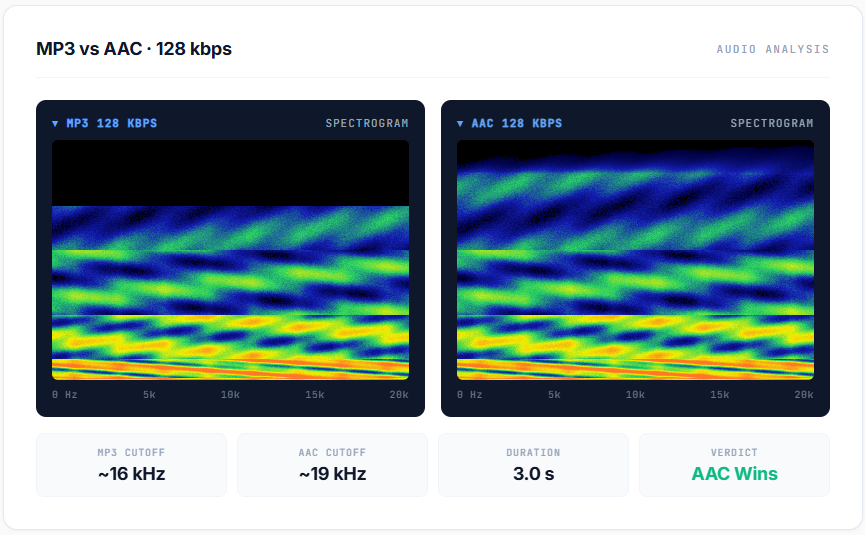
Spectrogram comparison: MP3 cuts off ~16kHz, AAC preserves up to ~19kHz
The most interesting finding: at 128kbps, AAC was fine for casual listening, but MP3 had clear problems. This matters because lots of older audio files online (and lots of streaming services in low-bandwidth mode) use exactly 128kbps. If you have control over the format, AAC saves your ears.
When MP3 is still the right answer
Despite all this, I'm not telling you to delete every MP3 you own. AAC's quality advantage doesn't matter if the file won't play on the device you need it on.
Use MP3 when:
- You're sending files to an older car stereo. Cars from before 2010 sometimes choke on AAC. MP3 just works.
- The recipient might use ancient hardware. Some old MP3 players, basic flip phones, very old Bluetooth speakers.
- You're uploading to a service that requires it. A few podcast hosts and old upload portals only accept MP3.
- You're at 256kbps or higher anyway. The AAC advantage shrinks to almost nothing at high bitrates.
For everything else — phones, computers, modern speakers, streaming — AAC is the better pick.
The metadata problem
One thing nobody warns you about: AAC's metadata situation is messier than MP3's.
MP3 uses ID3 tags. Almost every audio program in existence reads ID3 tags. Your album art, artist name, track number — all of it stays put.
AAC files (especially .m4a) use a different metadata system based on the MP4 container. Most modern software handles it fine, but I've seen a few older programs lose album art or display weird artist fields. If you're organizing a music library and metadata matters to you, this is worth knowing.
How to convert WAV or FLAC to AAC
Converting to AAC is the same process as converting to MP3 — the only difference is which output format you pick.
Using FlipWAV (browser, no upload):
- Drop your WAV or FLAC file onto the converter
- Select AAC as the output format
- Choose your bitrate — I recommend 192kbps for general use, 256kbps for music you actually care about
- Click convert and save the .m4a file
The whole thing happens in your browser. Nothing gets uploaded anywhere. Files of any size work because there's no server upload limit.
FAQ
The verdict
If your only criteria is sound quality per megabyte, AAC wins. It's not even close at lower bitrates, and at higher bitrates it at least ties while producing smaller files.
The reason MP3 is still around is inertia: 30 years of compatibility built into devices, software, and habit. That inertia matters in some situations, but it's slowly going away. If I were converting a music library today, I'd pick AAC at 256kbps and not look back.
Try converting one of your WAV or FLAC files to both formats yourself. Listen on whatever you normally listen on. You'll probably hear what I heard.
Try It Yourself
Convert WAV, FLAC, or MP3 files to AAC right in your browser.